Solo: big attitude in 15 seconds
The Solo routine in Angry Dance Filter AI puts one person into a lively exchange with the camera. Finger pointing, an open palm, and a deadpan stare turn an ordinary portrait into a playful comeback.
One photo. Big attitude.
Turn your photo into an angry dance video with bold gestures and dramatic attitude. Choose Solo, Baby or Kitchen, upload one clear photo, and let Angry Dance Filter AI bring the performance to life.
One-time credit packs, no subscription · Usually ready in 5 to 15 minutes · Failed renders are never charged
The trend
Angry Dance Filter AI turns one still photo into a playful argument with the camera. Pointing, open palms, forward leans, and exaggerated reactions give a familiar face a whole new attitude. Your image supplies the subject; the selected template sets the routine.
The result has the dramatic emotion of a reaction meme. You do not need an angry expression in your starting photo, and there is no performance to film. Use Angry Dance Filter AI for a lighthearted reply, a group-chat joke, or your own take on the angry dance trend.
Compare the input photo with the AI-generated result. Watch the subject's face, the hand gestures, and the framing to decide whether this is the style you want. The example shows a real output from this tool, giving you a concrete starting point before you choose your own image.
Seen a version on TikTok or CapCut? Creators use names such as “Angry Dance Filter” and “Angry Dance AI template.” Angry Dance Filter AI brings a photo-to-video workflow to your browser. Explore a creator's TikTok example or a related CapCut dance template for context, then use our preview to see the version available here.
How to use Angry Dance Filter AI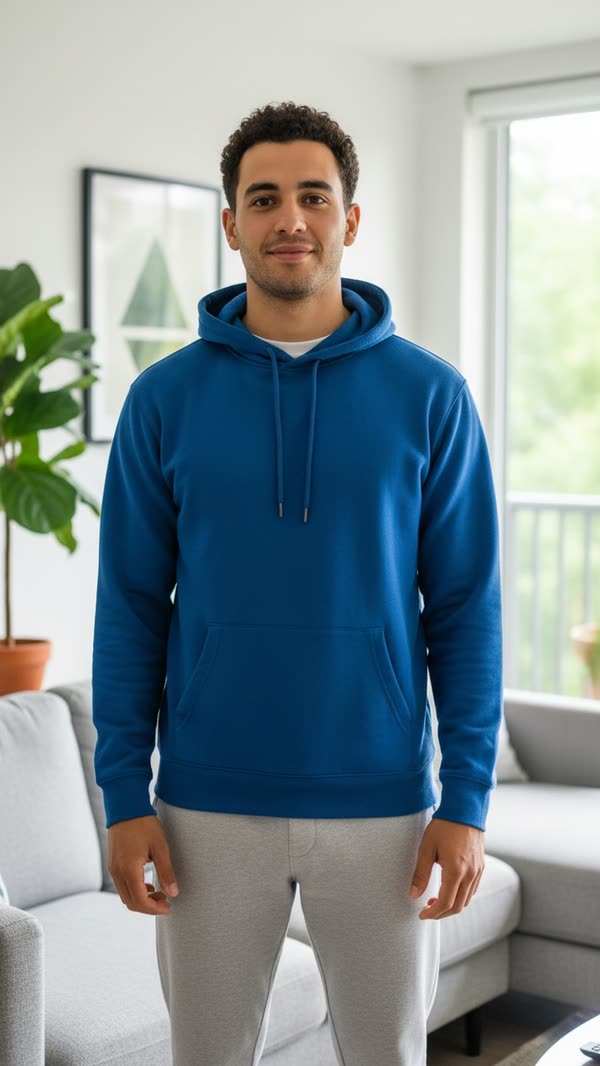 Input photo
How it works
Three steps take you from a still photo to a downloadable performance. Angry Dance Filter AI usually finishes in 5 to 15 minutes; review the example before you start.
Choose Solo for one person, Baby for a toddler, or Kitchen to replace the reference performer while keeping the moves and kitchen scene. Angry Dance Filter AI offers 480p / 720p / 1080p for Solo/Baby and 480p / 720p for Kitchen, with 720p selected by default.
Use a sharp photo with a visible face and room for the hands. Keep one person in frame, in even light. A neutral expression is fine; the template provides the attitude.
Check the displayed credit cost, then start. Angry Dance Filter AI makes a 15-second Solo, 27-second Baby, or 15-second Kitchen clip. During generation, you can leave the page and find the finished clip in My videos after signing back in to the same account. Watch the finished MP4 from beginning to end before you download.
Templates and ideas
Choose a performance, then give it a reason to react. A caption about a small everyday inconvenience can make an exaggerated gesture feel instantly familiar.
The Solo routine in Angry Dance Filter AI puts one person into a lively exchange with the camera. Finger pointing, an open palm, and a deadpan stare turn an ordinary portrait into a playful comeback.
Use Baby in Angry Dance Filter AI for a 27-second toddler routine with expressive hands and a second round of attitude. Choose a full-body photo of your own child, or one you have permission to animate.
Make an Angry Dance Filter AI reply to a late message, a changed plan, or the last slice of pizza. Keep the caption short and the joke friendly. A familiar face makes a group-chat reaction personal.
Give Angry Dance Filter AI a clear reference: one subject, a visible face, and a straightforward angle. Avoid heavy filters, blur, or shadows across the eyes. Leave space around the body so the gestures have room to read.
Pricing
Credit purchases are coming soon. New accounts get 20 free credits to try it.
$6.90
$9.90
$19.90
$49
$99
One-time credit packs · No subscription · Refund Policy
Why choose us
Preview the routine, choose your photo, and focus on the joke. The creation tools and download options stay together on this page.
Angry Dance Filter AI supplies the performance from one photo. You do not need to learn the routine, record a take, or write an animation prompt.
Open Angry Dance Filter AI in your browser. Download a vertical 9:16 MP4 without a watermark, then prepare your caption for TikTok, Reels, or Shorts.
Choose from 480p, 720p, 1080p, depending on the template. The studio starts at 720p and displays the available qualities and credits required before generating.
Angry Dance Filter AI uses one-time credit packs with no subscription. Credits never expire, and credits spent on a failed render return automatically.
FAQ
Choose Solo, Baby or Kitchen, upload one clear photo, and select your quality. Kitchen replaces the person while keeping the reference moves and kitchen scene. Review the credit cost, then generate. Once the clip is ready, watch the performance before downloading it.
No. Angry Dance Filter AI works in your browser, without a separate editing app. You can create and download your video here, then upload it to the social platform you use.
New accounts get 20 free credits. The studio shows the cost for your chosen template and quality before you start. Further generations can use a one-time credit pack, with no subscription.
Use a sharp photo of one person in even lighting, with the face visible and the upper body in frame. Angry Dance Filter AI supplies the expressions, so a neutral starting photo works.
Yes. Select Baby in Angry Dance Filter AI and upload a clear, full-body photo of a baby or toddler. The 27-second routine has its own preview, so watch that version before choosing your image.
Angry Dance Filter AI offers 480p, 720p, and 1080p for Solo/Baby. Kitchen supports 480p and 720p. The default is 720p. Choose your quality before generating; the studio updates the credit cost to match. Every option produces a vertical MP4.
Your photo guides the appearance, but Angry Dance Filter AI can change facial details, hands, clothing, or the background during movement. Review the whole clip, especially gestures near the face and turns.
If a render fails or times out, Angry Dance Filter AI returns the spent credits to your balance automatically. You can try again with another photo.
When Angry Dance Filter AI finishes, preview the result and download the MP4 without a watermark. Add your own caption before posting, or save the clip for a private chat with friends.
Choose a photo and give your next reaction a performance of its own. Angry Dance Filter AI turns your image into a playful camera-facing routine. Watch a template, pick a clear photo, and create a group-chat joke.